

October 9, 2026
Disability inclusion guidelines, organisational policy frameworks, and collaborative ecosystem structures for sustained digital resilience.
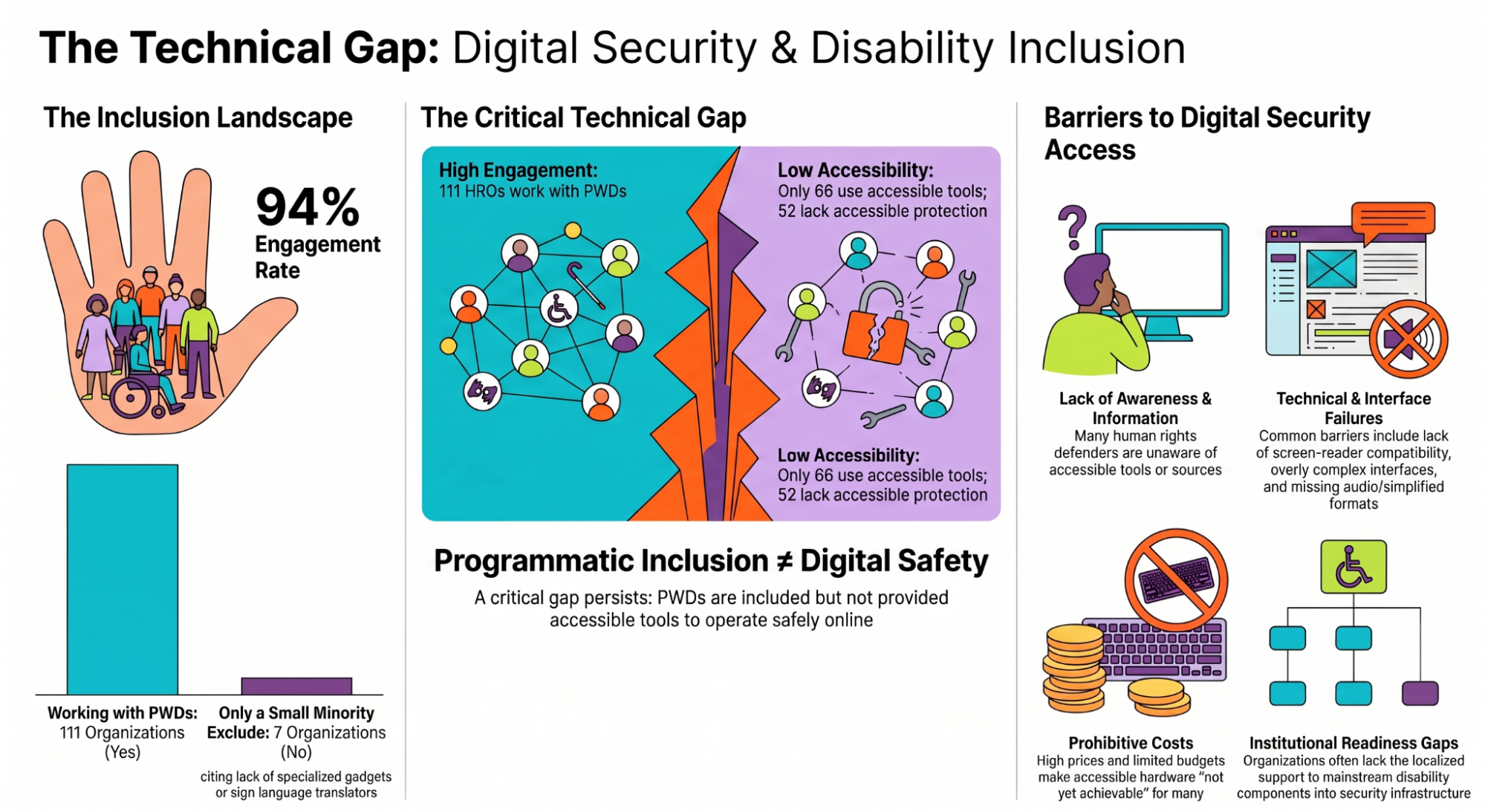
Digital security tools that do not work for persons with disabilities are not just inconvenient — they are dangerous. A human rights defender who cannot access a secure communications channel, read a phishing warning, or participate in an incident response process is a defender who is unprotected. In the Kenyan context, where a significant proportion of HROs work directly with PWD communities and where disability is frequently weaponised to exclude defenders from civic space, inaccessible security infrastructure is a human rights issue in its own right. This section sets out the specific, practical steps required to close that gap.
Table 21:Disability Inclusion
Term | Plain-language gloss to add in brackets |
WCAG 2.1 AA | the international standard for web accessibility — a set of rules that websites and tools must meet to be usable by persons with disabilities |
BYOD | Bring Your Own Device — a practice where staff use personal phones or laptops for work purposes |
IOC | Indicator of Compromise — a piece of technical evidence that a device or account may have been accessed by an attacker |
DPA 2019 | Kenya's Data Protection Act 2019 — the law that governs how organisations must collect, store, and protect personal data |
MFA | Multi-Factor Authentication — a security method that requires two or more steps to log in, such as a password plus a code sent to your phone |
BYOD policy | a written organisational rule governing how personal devices may be used for work, and what security measures must be in place |
The table below sets out what organisations need to do to make their digital security tools and training accessible to persons with different disabilities. For each type of disability, it explains what the need is, who it affects, what is required, and which tools already meet that requirement. You do not need to implement every row immediately - read through the table and identify which of your current staff or frequent contacts have access needs that are not yet being met, then prioritise those rows first.
Table 22:Accessibility Requirements
Accessibility Need | Affected Users | Requirement | Recommended Approach |
Screen Reader Compatibility | Visually impaired users who rely on NVDA, JAWS, or VoiceOver | Most GUI forensic tools have poor screen reader support. Prefer command-line tools (which are fully keyboard-navigable) or web-based tools with proper ARIA labelling. | Signal (excellent), CyberChef (good), MxToolbox web interface (good). |
Simplified Language | Low literacy users, non-technical staff, users with cognitive disabilities | Provide plain-language summaries of all security alerts and playbooks alongside the technical versions. Use the Flesch-Kincaid readability standard as a guide. | All staff-facing communications (phishing alerts, incident notifications) must be available in simplified text. Technical appendices may remain at higher reading levels. |
Captioning and Audio | Deaf and hard-of-hearing users | All training videos and tabletop exercise recordings must include captions. Live exercises must include a sign language interpreter or live captioning service. | Kenya Sign Language (KSL) interpreters should be contracted for all in-person digital security training events attended by deaf participants. |
Motor Accessibility | Users with limited hand mobility who cannot use a mouse or standard keyboard | All digital security tools and training platforms must be fully keyboard-navigable. Provide training on keyboard shortcuts for all recommended tools. | Windows Accessibility: Sticky Keys, Filter Keys, On-Screen Keyboard. macOS: Switch Control, Voice Control. |
Low-Bandwidth Access | Users in areas with unreliable or expensive internet connectivity | Ensure all critical playbooks, checklists, and contact directories are available as offline documents - not only as cloud-hosted links. | PDF versions of all playbooks stored on local devices and USB drives. Offline-capable training resources. |
Assistive Device Compatibility | Users with physical disabilities using alternative input devices | Procure forensic and investigation tools that are tested against WCAG 2.1 AA accessibility standards. Document accessibility ratings in tool procurement decisions. | Prioritise web-based tools with strong accessibility records. Budget for specialised hardware (switches, alternative keyboards) for staff who require them. |
A human rights monitor based in Nairobi who is blind has used a screen reader to navigate digital tools since 2017. When her organisation adopted a new incident documentation platform following a phishing attack, she was unable to use it: the tool's drag-and-drop interface was entirely inaccessible to her screen reader, with no keyboard navigation alternative. Her colleagues completed the documentation training without her.
“I knew the incident had happened. I could not contribute to documenting it. That is the kind of exclusion that does not show up in any security audit.”
The organisation subsequently adopted a command-line-based alternative for documentation tasks and ensured that all new tools are screen-reader tested before adoption — a requirement now embedded in their procurement policy.
The following accessibility assessments apply to the core tools recommended throughout this guidebook. These ratings are based on WCAG 2.1 AA compliance, screen reader testing, and keyboard navigation testing:
HOW TO USE: CyberChef
What it does: CyberChef is a free, browser-based tool for analysing and transforming data — most commonly used to defang suspicious URLs and decode encoded content safely.
Access: Open a web browser and go to: gchq.github.io/CyberChef (no account or download required).
Steps:
HOW TO USE: MxToolbox
What it does: MxToolbox is a free, browser-based tool for analysing email headers to identify the route an email took and check whether it has been tampered with or sent from a suspicious server.
Access: Open a web browser and go to: mxtoolbox.com/EmailHeaders (no account required).
Steps:
To analyse an email header:
HOW TO USE: Signal (Desktop)
What it does: Signal is an end-to-end encrypted messaging and calling app. Signal Desktop is the computer version, recommended for users who prefer keyboard navigation or use alternative input devices.
Access: Download from: signal.org/download — select the version for your operating system (Windows, Mac, or Linux). You will need an existing Signal account on a mobile phone to link the desktop app.
Steps:
HOW TO USE: Bitwarden
What it does: Bitwarden is a free, open-source password manager that securely stores all your passwords so you only need to remember one master password. It works across devices and browsers.
Access: Create a free account at: bitwarden.com. Download the browser extension for Chrome or Firefox, and optionally the desktop app from the same site.
Steps:
To export your vault (for backup): go to Settings, select Export Vault, choose Encrypted JSON format, and save the file securely offline.
All digital security training delivered under this guidebook must meet the following accessibility standards:
IMPORTANT | Procuring an interpreter after being asked is too late. When planning any training event, proactively ask all participants whether they have any accessibility requirements and ensure the budget and logistics are in place before the event. Treat accessibility as a default requirement, not an exception to be accommodated on request.
CASE STUDY 2 — Inaccessible training: a global example
In 2021, a digital security training programme serving civil society organisations across East Africa delivered a three-day residential workshop on secure communications. All training materials were provided as video recordings without captions. One participant, a deaf human rights lawyer from Uganda, was unable to access approximately 60% of the content.
She completed the training by relying on written notes from a colleague, missing the live demonstrations entirely. A post-training evaluation found she had rated her own confidence in the tools covered - tools she had been unable to see demonstrated - as significantly lower than hearing participants.
Digital security training that is inaccessible does not merely inconvenience participants with disabilities - it creates a measurable gap in protection.
Organisational Policy: A formal, written document that defines the rules, responsibilities, and procedures governing a specific area of organisational practice. Policies approved by leadership and signed by staff create legally enforceable obligations and provide the governance backbone for sustainable digital security.
Most digital security failures in Kenyan HROs are not caused by sophisticated attackers. They are caused by unclear rules - staff who do not know whether they can use a personal phone for sensitive work, organisations that have never decided what counts as a security incident, and leaders who have not approved a process for revoking access when a staff member leaves. Formal written policies exist to solve exactly this problem. They turn individual good judgements into shared, consistent practice that continues regardless of who is in post. Without them, your organisation's security is as strong - or as weak - as its least-informed staff member on any given day.
The table below describes six written policies that every Kenyan human rights organisation should have in place. A policy is simply a formal document that sets out the rules for how something is done - who is responsible, what the steps are, and what happens if something goes wrong. You do not need a legal or technical background to use this table.
For each policy, the table explains what it covers, who needs to approve it, and why it matters specifically for Kenyan HROs. If your organisation does not yet have one of these policies, treat that as a priority action.
Table 23:Organisational Policy Frameworks
Policy | Purpose | Governance Requirements | Why It Is Critical for Kenyan HROs |
Incident Management Policy | Defines what constitutes a digital security incident, escalation levels, role assignments, and the general response framework | Board / Leadership approval required. Must be reviewed annually and after every major incident. | Without this policy, organisations are legally vulnerable under the DPA 2019. Only 21% of surveyed Kenyan HROs have one. |
BYOD Policy | Governs use of personal devices for organisational work - encryption requirements, data segregation, remote wipe protocols, acceptable apps | All staff must sign acknowledgement. Must include provisions for staff who leave the organisation. | BYOD is the default infrastructure model for Kenyan HRDs. Operating without a policy creates unmanaged legal and security risk. |
Data Classification Policy | Defines categories of organisational data (Public / Internal / Confidential / Restricted) and the handling requirements for each | All staff must be trained on classification labels. Applies to digital and physical documents. | Drives data minimisation compliance under DPA 2019 and limits breach impact by ensuring sensitive data receives stronger controls. |
Backup and Recovery Policy | Mandates backup frequency, encryption requirements, off-site storage, and restoration testing schedules | IT Lead owns implementation. Leadership approves the budget. Backup restoration must be tested quarterly. | Ad hoc, untested backups fail when needed most. Policy ensures backups are reliable and off-site when the primary system is destroyed or seized. |
Access Control Policy | Defines role-based access levels, password requirements, MFA mandates, and procedures for revoking access when staff leave | HR and IT jointly own. Must be updated within 24 hours of any staff departure or role change. | Limits the blast radius of a compromised credential. Staff who have left the organisation should not retain system access. |
Acceptable Use Policy | Defines permitted and prohibited uses of organisational systems, devices, and accounts | All staff sign at onboarding and annually. Covers social media, personal use, and third-party apps. | Establishes the baseline for insider threat investigations and HR disciplinary processes. |
No single organisation can protect itself alone. The most sophisticated attacks targeting Kenyan civil society are coordinated across multiple targets simultaneously - an organisation that detects and documents an attack in isolation provides no protection to its peers. At the same time, no small HRO can afford to maintain in-house expertise in malware analysis, mobile forensics, legal strategy, and crisis communications. Collaboration is not a nice-to-have: it is the structural condition that makes effective digital security possible for organisations without dedicated security teams. This section describes how to participate in and contribute to the collective defence ecosystem.
Table 24:List of support organizations for HRDs
Organisation | Scope | Services Provided | When to Contact |
Tatua Digital Resilience Centre | Kenya - Regional | 24/7 rapid response: device analysis, spyware detection, cleanup, data recovery. Digital Forensic hub for Kenyan civil society. | Primary first-call for all technical incidents exceeding internal capacity. Apply for assessment toolkit for initial screening. |
Defenders Coalition | Kenya - National defenders coalition | Integrated digital and physical security support for HRDs facing combined threats. Legal referral network. | Contact when a digital incident has a physical threat dimension - device seizure, office raids, personal safety concerns. |
Access Now Digital Security Helpline | International | 24/7 multilingual incident response support for civil society. Free. Accepts cases from Kenya. | For incidents requiring international expertise or when Kenyan organisations are at capacity. Available in multiple languages. |
Citizen Lab | International - Academic | Advanced forensic analysis of commercial spyware (Pegasus) against civil society. Research-backed, confidential. | Contact when sophisticated state-grade spyware is suspected. Provides full forensic analysis and, where possible, vulnerability disclosure to device manufacturers. |
Amnesty International Tech | International | Security research and forensic support for civil society, specialising in commercial surveillance. Developers of MVT (Mobile Verification Toolkit). | Partner for mobile spyware analysis . Can analyse iOS and Android backups for known IOCs. |
Digital First Aid Kit (DFAK) | International - Community | Collaborative resource for diagnosing common digital emergencies and finding vetted support providers by region. | First-stop reference for defenders who are unsure where to escalate. |
KICTANet | Kenya - Policy | ICT policy advocacy, digital rights research, and information sharing across the Kenyan digital ecosystem. | Information sharing partner. Provides policy context for legal advocacy following digital rights violations. |
5.3 c Reaching community-based and grassroots organisations
The collaborative framework described in this section is primarily designed for formally structured human rights organisations with established digital infrastructure. However, much of Kenya's human rights work is carried out by community-based organisations (CBOs), grassroots groups, and informal networks that may have limited digital exposure, unstable internet connectivity, few dedicated staff, and no formal IT function.
These organisations are not less important to protect - they are often more vulnerable. They operate closer to risk, are targeted precisely because of their community presence, and rarely have access to specialist digital security support. The following adaptations are recommended for organisations and trainers working with CBOs and grassroots groups.
Adapted referral pathways
The support organisation directory in Section 5.3(b) assumes that organisations can make initial contact digitally and have staff who can describe a technical incident in some detail. For CBOs, a trusted intermediary model is more effective: partner organisations such as Defenders Coalition or Tatua can serve as first-contact points, triage the situation on behalf of the CBO, and manage the referral process. CBOs should be introduced to these partners before an incident occurs - ideally at a community training event - so that the relationship and contact details are already established.
Oral and in-person formats
Many CBOs operate primarily in oral and in-person communication modes. Written playbooks, online checklists, and email-based alert systems will not reach these groups effectively. Consider supplementing written materials with:
Cascade training
Rather than requiring CBO staff to attend full digital security training programmes (which may require travel, literacy in technical concepts, and sustained attention to complex content), consider a cascade model: one or two people from a CBO attend a condensed, accessible version of the training and return to brief their colleagues in their own language and context. The Tatua Digital Resilience Centre and Defenders Coalition can advise on cascade training formats appropriate for different community contexts.
Minimum viable actions for CBOs
Organisations that cannot immediately implement the full recommendations of this guidebook should prioritise the following three actions as a starting point:
These three actions do not require technical expertise, digital infrastructure, or significant time - and they meaningfully reduce the most common risks facing CBOs.
APPENDICES
The links below provide the reporting mechanisms for cyber incidents and data breaches to the respective responsible organisations in Kenya
[1] The Hacker News - Citizen Lab Finds Cellebrite Tool Used on Kenyan Activist’s Phone in Police Custody, 2026, https://thehackernews.com/2026/02/citizen-lab-finds-cellebrite-tool-used.html. Accessed 24 04 2026.
[2] APC - Joint stakeholder report: Human rights in the digital context in Kenya: https://www.apc.org/sites/default/files/kenya-upr-joint-stakeholder-report-2024.pdincludef
[3] Malik, A. S., Acharya, S., & Humane, S. (2024). Exploring the Impact of Security Technologies on Mental Health: A Comprehensive Review. Cureus, 16(2), e53664. https://doi.org/10.7759/cureus.53664