Cybercriminals continually attempt to obtain personal information through phishing, but with the right awareness, you can avoid becoming a victim.
Phishing is a type of online fraud in which criminals impersonate a trusted individual, organisation, or institution to persuade people to click malicious links, download harmful files, or disclose sensitive information such as passwords, M-Pesa PINs, bank details, or credit card information. These scams can arrive through almost any communication channel, including email, SMS, WhatsApp, social media, phone calls, and direct messages. Criminals may also use physical mail, although such schemes are generally classified as mail fraud.
Phishing is the most common form of “social engineering,” a technique in which attackers rely on manipulation and deception rather than advanced technical skills to achieve their objectives.
The positive news is that phishing attempts become easier to identify once you understand their common patterns. Although spelling mistakes and poor grammar are less frequent than they once were, phishing messages still rely heavily on creating a sense of urgency.
What Does a Phishing Message Look Like?
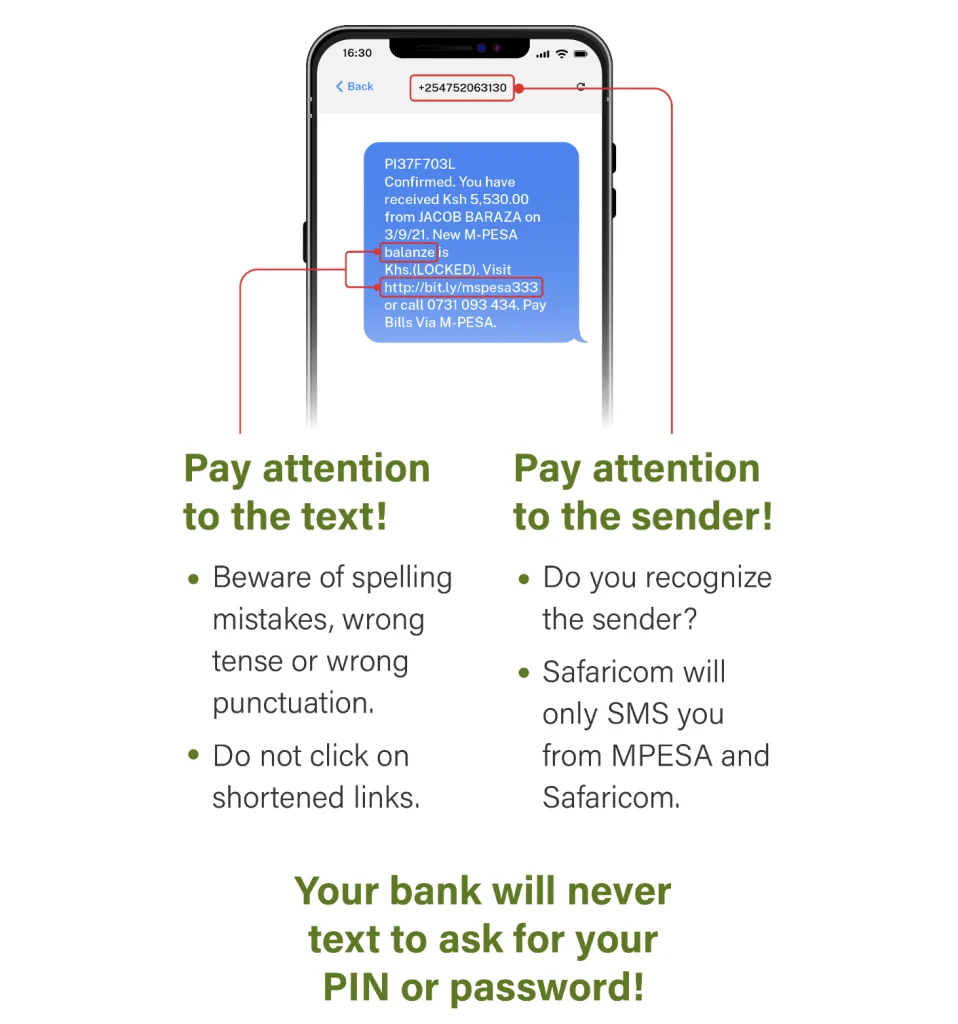
Phishing messages are increasingly sophisticated, but they typically encourage recipients to take immediate action, for example, opening a link, responding to a text message, downloading an attachment, or entering login credentials, mobile-money PINs, or banking details. Even in an era where artificial intelligence can produce polished content, several warning signs remain useful.
Source: Kubilay et al. (2023)
Offers That Appear Too Good To Be True
Some phishing messages appeal to excitement or opportunity. For example: “Congratulations! You have won KES 50,000 in the Safaricom Promotion!” Messages offering free money, prizes, airtime, or exclusive deals are often fraudulent, particularly when you do not recall entering a promotion. The sender’s phone number or email address may also appear unusual, containing excessive numbers or an unfamiliar domain.
If an unexpected offer seems unrealistically generous, delete the message and report it.
Urgent or Threatening Language
Scammers also use fear to pressure recipients into acting quickly. Common examples include:
- “Your M-Pesa account will be blocked!”
- “Your bank account will be suspended unless you update your details now!”
- “You are under investigation by the Kenya Revenue Authority!”
- “Act immediately to avoid penalties!”
Do not click links, download attachments, or respond to such messages. Instead, report and delete them. Legitimate organisations, companies, banks, mobile-money providers, and government agencies do not typically ask customers to share PINs, passwords, or one-time passwords (OTPs) through SMS, email, or WhatsApp.
Requests for Sensitive Information
Reputable organisations do not request M-Pesa PINs, bank passwords, National Social Security Fund (NSSF) numbers, Kenya Revenue Authority (KRA) PINs, National ID numbers, or financial details through email or text messages. If you receive a suspicious message that appears to come from an organisation you recognise, verify it independently by visiting its official website, calling the number on your bank card or official statement, or visiting a physical branch. Do not use the contact information provided in the message.
Unexpected Requests
Exercise particular caution when receiving unexpected requests, including:
- Invoices you do not recognise
- Sudden payment demands
- Requests to send money through M-Pesa, bank transfers, or mobile-money apps
- Messages asking you to buy gift cards or share a transaction code
Avoid sending money to unknown individuals or through unusual channels simply because a message appears urgent. Requests for payment through gift cards, cryptocurrency, courier-delivered cash, or unverified mobile-money numbers are commonly associated with fraud.
Suspicious Sender Addresses and Phone Numbers
Review the sender’s email address or phone number carefully. Small spelling changes or unfamiliar domains for example, safaricorn.com ,which has ‘rn’ instead of ‘m’ where the correct domain is safaricom.com are significant warning signs. Be equally cautious with phone numbers that closely resemble official business numbers but contain an extra digit or unusual formatting.
Suspicious Links or Attachments
On a laptop or desktop computer, hovering over a link before clicking can often reveal its actual destination.
Do not download attachments you were not expecting, even if they appear to come from someone you know. Verify the legitimacy of the file independently before opening it.
Poor Writing or Formatting
Phishing messages were once easy to identify because of obvious spelling and grammar errors. However, many are now written using polished language assisted by artificial intelligence. Even so, unnatural phrasing, inconsistencies, or unusual formatting should still raise concern.
Generic Greetings
Messages that begin with “Dear Customer” rather than addressing you by name may indicate a mass phishing campaign. Although this tactic is less common today, it remains a useful warning sign.
Why Do Phishing Scams Create Urgency?
Urgency is one of the most reliable indicators of phishing.
Scammers want recipients to act quickly before they have time to assess the message carefully.
They commonly create urgency in two ways.
Positive Urgency
- “You’ve won a prize!”
- “Claim your M-Pesa reward now!”
- “Limited-time offer!”
- “You have been selected for a government grant!”
Negative Urgency
- “Your M-Pesa account has been hacked!”
- “Your bank account will be closed today!”
- “The Kenya Revenue Authority is investigating you!”
- “You will be arrested if you do not respond!”
Think Before You Click
Phishing messages are designed to trigger panic or excitement, both of which can lead to rushed and risky decisions.
Reality check: Legitimate organisations, including banks, mobile-money providers, and government agencies such as the Kenya Revenue Authority or the National Police Service, do not handle serious matters through unexpected messages demanding PINs, passwords, or immediate payments.
Take a Few Seconds Before Responding
One of the simplest ways to avoid phishing is to pause before taking action. Spending even 5 to 9 seconds reviewing a message can help reduce panic and support clearer decision-making. Although this may seem like a small step, it can significantly reduce risk.
Before clicking a link, responding to a message, or downloading a file, ask yourself:
- Was I expecting this message?
- Does anything seem unusual?
- Is the sender genuinely who they claim to be?
- Am I being pressured to act immediately?
- Is someone asking for my M-Pesa PIN, bank OTP, or password?
If you are unsure, do not engage with the message.
It can also be helpful to seek a second opinion from a colleague, friend, or family member.
No legitimate message should require an immediate response.
What Is Spear Phishing?
Some phishing attacks are highly targeted. This approach is known as spear phishing—similar to using a specialised spear to target one particular fish rather than casting a wide net.
In spear-phishing attacks, criminals may already possess information about the recipient, such as:
- Their name
- Their job title or employer
- Their email address or phone number
- The names of colleagues, friends, or associates
Scammers often gather this information from social media profiles, public business directories, or other publicly available sources to make their messages appear more credible.
Even when a message appears personal, remain cautious if it includes urgency or unusual requests.
For example, a company’s chief executive officer is unlikely to ask an employee to purchase gift cards or send money from their personal M-Pesa account.
What To Do If You Receive a Phishing Message
If you believe you have received a phishing attempt, take the following steps.
Step 1: Do Not Click or Reply
Avoid clicking links, downloading attachments, or responding to the message. Even “unsubscribe” links or buttons can be malicious.
Step 2: Report the Message
- At work: Report the message to your IT or security team.
- At home: Use your email provider’s “Report Phishing” feature.
- For suspected fraud involving M-Pesa, Airtel Money, or your bank: Contact the provider directly using the official customer-care number listed on its website, official app, or your bank card.
Report a phish on Outlook.
Report a phish on Gmail.
Report a phish on Mac Mail.
Step 3: Block the Sender
Blocking the sender can help prevent further messages from the same phone number or email address.
Step 4: Delete the Message
Once reported, delete the message from your inbox or messaging app to reduce the risk of accidentally interacting with it later.
How To Strengthen Your Protection Against Phishing
Because phishing messages can sometimes bypass spam filters, adopting strong security practices is essential. These measures can help protect your accounts even if you encounter a convincing scam.
Use Multifactor Authentication (MFA)
Enabling a second verification step makes it substantially more difficult for attackers to access your accounts. Never share your MFA code, M-Pesa PIN, bank OTP, or one-time password with anyone.
Use Strong, Unique Passwords
Use a different password for every account, ideally containing at least 16 characters. Password managers can make this practice easier to maintain.
Keep Software Updated
Regular software updates address security vulnerabilities that scammers may attempt to exploit.
Why Reporting Phishing Matters
Reporting phishing protects not only you but also others who may receive similar messages.
Email providers, mobile-money providers, banks, and security teams use reports to:
- Block scam messages
- Disable malicious sender accounts
- Improve fraud-detection systems
Your report may help prevent someone else from falling victim to the same scam.
A Brief Pause Is Your Best Defence Against Phishing
Phishing scams depend on quick reactions. Taking a few seconds to assess a message can make a significant difference.
If something feels suspicious, trust your instincts. Pause, verify the message independently, and when in doubt, do not click.
Frequently Asked Questions
What is phishing in simple terms?
Phishing is a scam in which criminals use digital communication, such as email, SMS, or WhatsApp, to trick people into clicking malicious links, downloading harmful attachments, or sharing personal information such as M-Pesa PINs, bank details, or passwords.
How can you tell whether a message is phishing?
Messages that create urgency, arrive unexpectedly, contain suspicious links, request PINs or OTPs, or originate from sender addresses or phone numbers that do not match the claimed organisation are often phishing attempts.
What should you do if you click a phishing link?
If this occurs at work, report the incident to your IT or security team. Disconnect from the internet, run a security scan using your device’s security software, and change any passwords that may have been exposed or compromised. If you shared banking or mobile-money details, contact your bank or mobile-money provider immediately.
Can phishing occur through text messages or social media?
Yes. Phishing can take place through text messages (“smishing”), phone calls (“vishing”), WhatsApp, social media platforms, and direct messages not only email.