
Online fraud is growing more sophisticated across Kenya, with scammers increasingly impersonating trusted local services – from government portals to popular transport providers like Kenya Railways. These fraudsters create cloned websites and fake booking pages that look legitimate, then pressure users into non-reversible payments through mobile money or unsafe channels. This article explains how to spot these fake sites, protects you from common local scams (including SGR booking fraud), and gives practical steps to take if you or your organisation is targeted.
Why Kenyan users are prime targets
Kenya’s high mobile-money adoption and fast digital growth make the country an attractive environment for fraud. Scammers exploit common behaviours: responding quickly to urgent offers, trusting messages that appear to come from familiar brands, and paying through M-Pesa or USSD channels that are hard to reverse. Because many legitimate services use short messages and USSD codes, cloned pages and phishing SMS can look especially convincing.
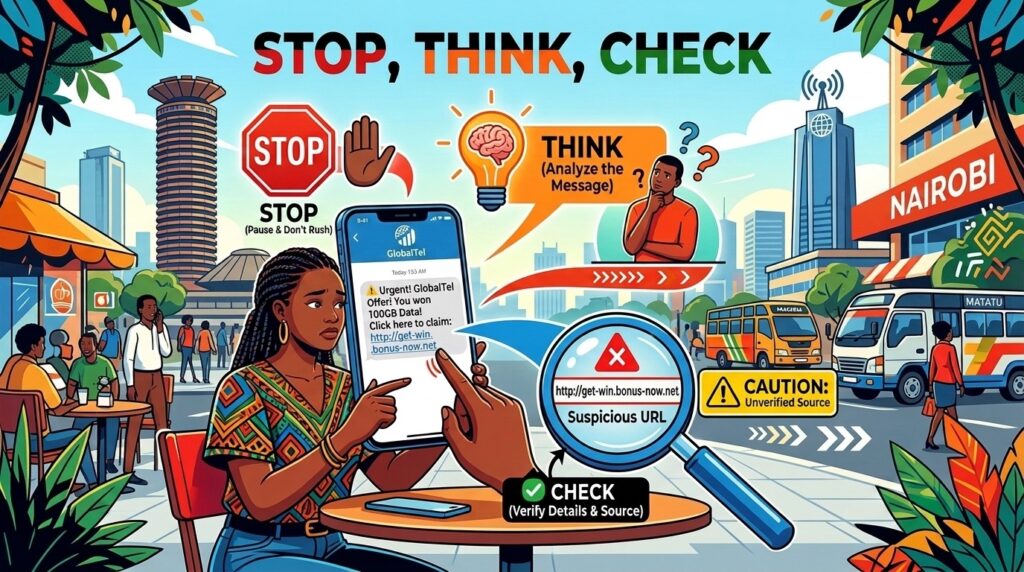
The “Stop, Think, Check” rule — 30 seconds that save you trouble
Before you click a link, give yourself 30 seconds to follow these three steps.
- STOP — Resist urgency. Scammers rely on panic. If a message pressures you to act now (“last seats,” “pay now or lose booking”), pause.
- THINK — Ask practical questions: Did I request this? Is the payment channel unusual (personal M-Pesa number, unfamiliar till)? Would the real organisation contact me this way?
- CHECK — Verify independently. Type the company’s official URL manually, use a verified USSD code (for SGR, use *639#), or call the organisation using the number on their official site. Never use the contact details provided in the suspicious message.
How to identify a fake website
Look for these clear warning signs when assessing a Kenyan website:
- Domain and URL inconsistencies: Scammers often register lookalike domains or use subdomains that mimic legitimate sites. Official Kenyan services commonly use “.ke” or “.co.ke”; however, presence of these does not guarantee safety — check for subtle misspellings or extra words.
- New or thin digital footprint: Most phishing sites are recently created and have few or no independent reviews, social mentions, or indexed pages.
- Unprofessional presentation: Poor grammar, pixelated logos, broken links, and generic email addresses (Gmail, Hotmail) instead of a business domain are red flags.
- Suspicious payment channels: Be wary if a site asks for payment via a personal M-Pesa number, unfamiliar till numbers, or instructs you to use an unusual USSD code.
- Missing or incorrect contact information: Legitimate organisations list verifiable phone numbers, physical addresses, and clear customer support channels.
- Browser and security warnings: Modern browsers flag unsafe sites. Don’t ignore warnings such as “Not secure” or explicit phishing alerts.
Examples of Kenyan scams to watch
- Madaraka Express (SGR) booking fraud: Fraudulent websites and social pages claim to sell SGR tickets and collect payment directly. Always use the official Madaraka Express portal, the *639# USSD service, or visit stations in person.
- Mobile-payment exploitation: Scammers push victims to make irreversible payments via M-Pesa or to follow unauthorized USSD prompts. Unlike card fraud, these transactions are often final.
- Impersonation of government agencies or utilities: Scammers mimic the branding and tone of public bodies to request personal data or payments for fake services.
Practical steps to protect yourself and your organisation
- Use verified channels only: Bookmark official websites, use verified USSD codes, and type URLs manually instead of clicking links from unsolicited SMS or social media.
- Implement account security: Enable two-factor authentication (2FA) and use unique, strong passwords. Consider a password manager for convenience and security.
- Train your team and family: Share the “Stop, Think, Check” rule and common red flags with colleagues, employees, and relatives who book services online.
- Check the digital footprint: Search for the company’s name plus keywords like “scam,” “fraud,” or “complaint.” Look for recent reports or warnings from official sources.
- Verify contact details independently: Use phone numbers on official websites or known office addresses to confirm offers or booking confirmations.
- Keep software updated: Use current browser and OS versions and enable security patches to reduce vulnerability to malicious scripts.
What to do if you think you were scammed
- Disconnect and stop interaction: Close the browser and don’t provide further information.
- Contact your bank or mobile provider immediately: Report the fraud and request a block on transactions or an account freeze where possible.
- Change passwords: Update any account credentials that may have been compromised, especially if reused across sites.
- Report the incident: Notify the organisation being impersonated (for example, Kenya Railways) and report the fraud to relevant authorities and platforms so they can warn others.
- Preserve evidence: Save screenshots, message text, payment receipts, and the fraudulent URL – these help investigations and recovery efforts.
A simple preventive checklist
- Pause for 30 seconds: apply Stop, Think, Check.
- Confirm the URL: type it yourself and inspect the domain closely.
- Use official payment channels: verified USSD or organisation-managed portals.
- Look for professional contact details and a real digital footprint.
- Enable 2FA and unique passwords.
- Report suspicious sites and messages promptly.
Closing note
As Kenya’s digital economy grows, so will attempts to exploit trusted brands and routine transactions. Most scams are avoidable by applying a few habits: slow down, verify independently, and use official payment channels. When in doubt, stop and check — it’s the simplest way to protect your information and money.
For support with digital resilience assessments, cyber hygiene training, or policy development, reach out to us at info@tatua.digital or help@tatua.digital . Watch our Cyber Hygiene series on YouTube or Digital Security Resources for accessible tips.